━━ NOTE 01 · ON THE WINDSHIELD
Live traffic, chargers, and driver alerts — on your Tesla's screen.
A community layer that runs next to your Tesla nav. Always one corner ahead.
- Police, hazard & jam alerts from drivers ahead
- Every charging network — not just Superchargers
- No install — runs in the Tesla browser
FREE DURING BETA · ACCESS OPENS HOURLY · FOUNDERS SKIP THE LINE
━━ NOTE 03 · HOW IT WORKS
On your windshield in three steps.
Magic link, no password. Your spot on the launch grid comes up in an hourly start — or a friend fast-tracks you.
Pair the car with a QR scan from your phone — no typing on the car screen. Pin the tab and it's installed.
Alerts and chargers appear live as drivers post them. No app, no firmware wait, no update to install — ever.
━━ NOTE 04 · IN THE CAR
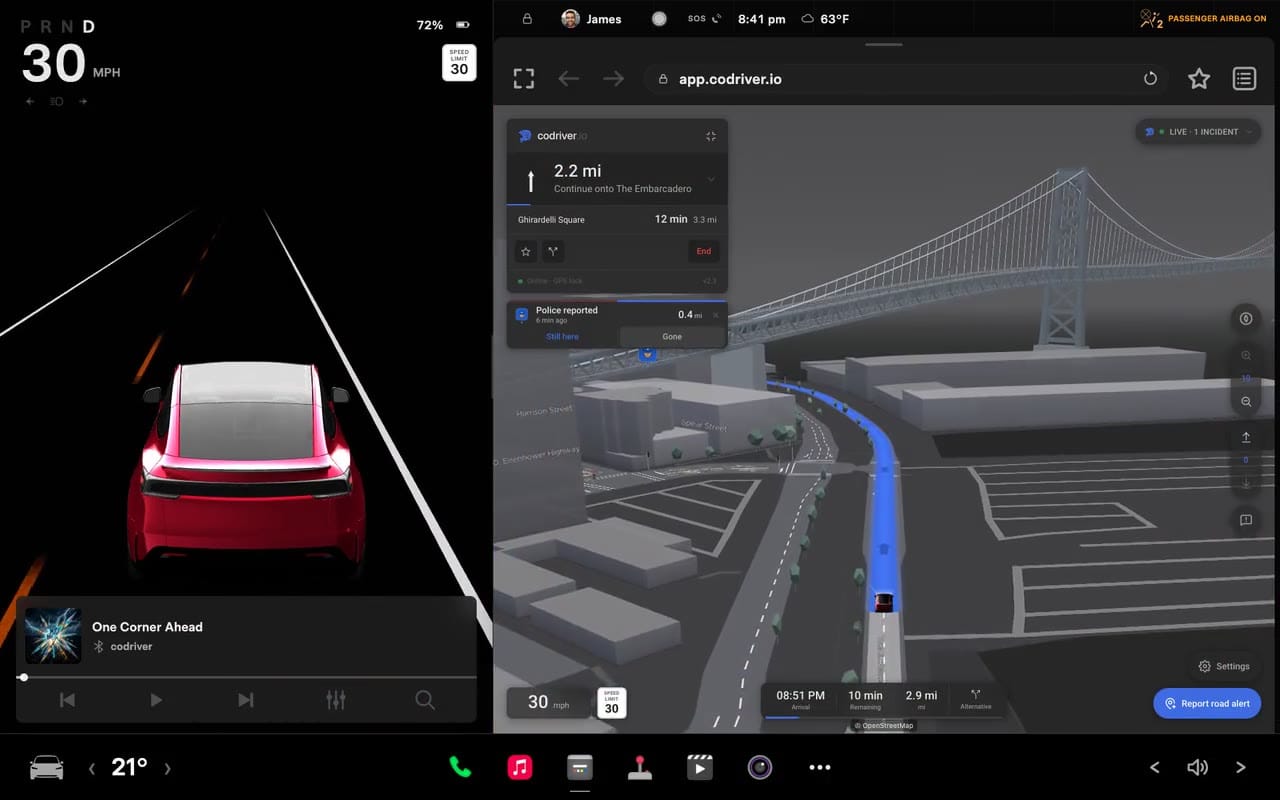
See it in the car.
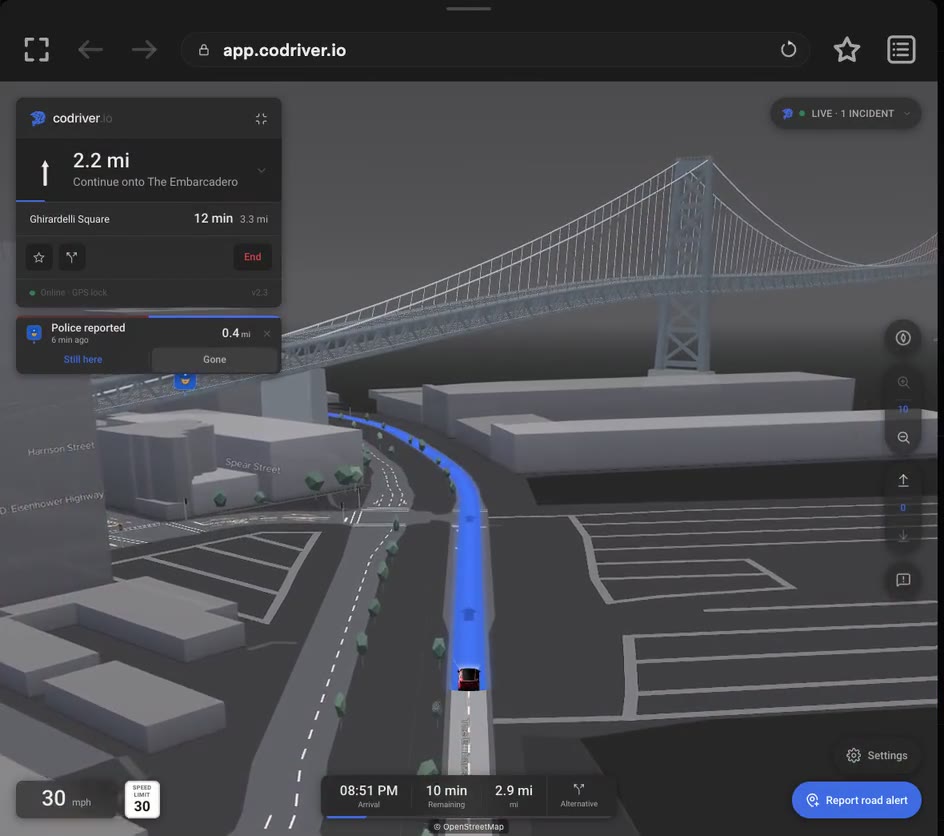
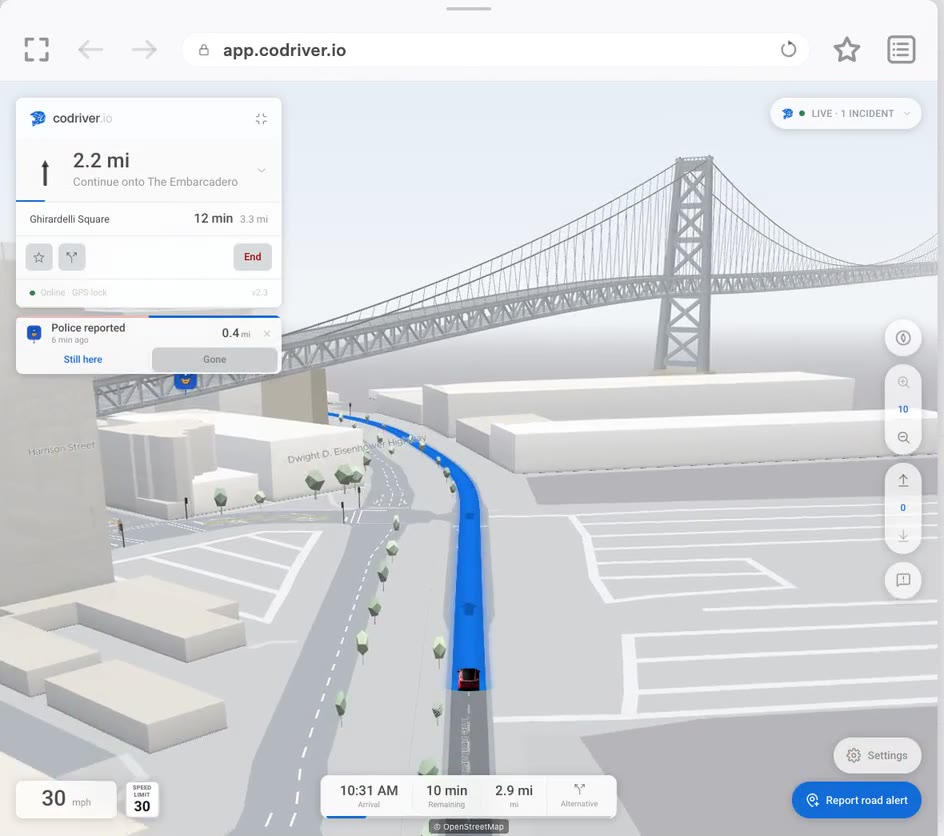
Pace notes called in tight cadence. Distances over adjectives. “Cop. 800 m. Right bend.” The car stays yours; the layer stays out of the way until it's the moment to know.
- ━━ Heading-up Track + 3D Tilt or Cityscape — whichever you read fastest.
- ━━ Live alerts within your look-ahead radius. Highway = 8 km, urban = 1.5 km.
- ━━ Auto-reroute only on real drift (>60 m, ≥30 s). No twitchy chatter.
━━ NOTE 05 · VIEW MODES
Four ways to see the road. Free gets both 2D views.
Same map, four perspectives. Free unlocks Compass — north-up, for familiar roads — and Track, which turns with you through unfamiliar suburbs. Premium adds the 3D pair: tilted Tilt for highway, full Cityscape for downtown.
Compass
Free2D · north-up · the road in front of you
Track
Free2D · follows your heading · windshield-style
Tilt
Premium3D · terrain only · clean lines at speed
Cityscape
Premium3D · with buildings · downtown context
Compass and Track are free on every car. Tilt and Cityscape are Premium, and are drawn by our own 3D engine — which runs them on the older Intel cars too.
━━ NOTE 06 · THE ENGINE UNDERNEATHPremium
We built our own 3D map engine.
codriver runs inside the Tesla’s own browser — nothing to install, nothing to wait for. That is the whole idea, and it is also our hardest constraint. It landed hardest on the map, so we stopped tuning a general-purpose engine and wrote our own for a single target.
Same car, same afternoon. On the older Intel cars the 3D map now runs two to three times faster than the flat one — and at 25 fps a map stops being something you tolerate and becomes something you can actually glance at while driving. It holds 60 fps on a 2023 Model Y, and it was proved on a 2017 Model S.
We expected those older cars to become merely usable. The name came after the numbers did — a peregrine is the fastest animal alive, and the trick was never the raw speed, it is staying composed in the dive. It draws the Tilt and Cityscape views; those are Premium, Compass and Track are free and stay free.
━━ NOTE 07 · WHAT TESLA FORGOT
The codriver Tesla didn't ship.
Tesla put a desktop-class browser in your dash and then left it idling. No community alerts. No chargers beyond its own network. No way for drivers to share what they know about the road ahead. codriver is the app the community had to build itself — a live map of what other drivers see right now, an EV-aware view of the route, and a calm second voice that reads it back to you without nagging.
A 17-inch landscape display, a real modern browser, GPS, sensors — and one of the thinnest in-car app ecosystems in the industry. The hardware is waiting for the apps Tesla never shipped.
codriver runs in that browser. Live driver reports, EV-aware route notes, pinned community knowledge — all on a map you can read at speed.
Once you're in, the install is just opening codriver.io in your Tesla's browser. Updates ship the moment we push them — no waiting on a vehicle firmware release.
━━ NOTE 08 · UNDER THE HOOD
Engineered for the windshield, not the desk.
Other apps recalculate every time GPS twitches or you drift across a lane. codriver doesn't. We reroute only when you've actually left the line — 60 m off, max once every 30 seconds — and refresh traffic every five minutes. Less chatter, more confidence in what's on screen.
Follows your car with the road ahead facing up — like a windshield, not a paper map. Camera zooms out at highway speed and tilts down in town, so you see further when you are moving fast and more detail when you are not. It anticipates your line, so you are not chasing a lagging dot.
Superchargers, ChargePoint, Electrify America, IONITY — the whole picture, not just Tesla's network. Filters know your car: connectors it can plug into natively on by default, adapter-only stations opt-in, free vs. paid, AC to 150 kW+ ultra-fast — tuned to your region automatically.
The pre-2022 Intel cars used to be the compromise — about 10 fps, and a warning before you opened a 3D view. So we built our own 3D map engine for them. On a 2019 Model 3 it now draws the full 3D map at 25–35 fps, where the ordinary flat map on that same car manages 10–15; it was proved on a 2017 Model S too, and it holds 60 fps on a 2023 Model Y. How Peregrine works.
━━ NOTE 09 · PACE NOTES
Codriver, not coach.
Built by drivers who got tired of being scolded by their own dashboards. Every label on the screen is a pace note: distances and facts over encouragement, no emoji, no exclamation marks, no soft language. Read it in a glance, look back at the road. Peer-to-peer, never coach-to-student.
“⚠️ Caution: Law enforcement detected ahead. Please reduce your speed and obey all posted limits.”
“Cop. 800 m. Right bend.”
━━ FROM OUR PACE NOTE GUIDE · §1.2 CALM AT SPEED
The codriver in the right seat reads what's ahead and puts it on the glass in three words — never grabs the wheel, never asks if you're sure. The product flows from that single image.
━━ NOTE 10 · BUILT FOR THIS CAR
Made for the car you already own.
One window into your Tesla browser. No app to install, no firmware to wait on, no tablet velcroed to the dash. The driver-app loads in seconds and looks like it shipped from the factory — because it speaks the same minimal language the Tesla UI already does.
Same browser, same app across Model 3, Y, S, X and Cybertruck. The pre-2022 Intel cars are not a lesser tier any more — our own 3D engine runs them at 25–35 fps, proved on a 2019 Model 3 and a 2017 Model S.
In the car, type codriver.io into the Tesla's browser. Pin it. Done. No App Store, no firmware wait, no rooted car.
Same restraint: deep neutrals, mono numerics, one accent. No alarms, no clutter, no animations that lag the GPU.
Link your Tesla account and the car tells codriver what it already knows: the destination you set on the Tesla nav — routed, no retyping — and which car you actually own, straight into the Garage. Read-only. No commands, never wakes the car. Google or email sign-in works without it.
━━ NOTE 11 · OWNED BY DRIVERS
Built in the right seat. Owned by drivers.
codriver is community-sourced, pseudonymous by default, and hosted in the EU (Helsinki). Your reports help everyone behind you. No ads, no surveillance, no upsell to a Google account. The data layer is open — plug in additional sources if you want, or drive.
No accounts required to read the map. Community alerts are submitted unsigned — no identity attached to the row. We don't track where you drove, what you searched, or where you're going. We can't sell what we don't have.
Live alerts from drivers ahead, charger reliability from drivers behind, route notes from drivers who've been there before. The road is loud — we listen. Built in the open — ride along at @codriver_io.
Don't like our default sources? Swap them. The data layer is open — community-built sources slot in without breaking anything. Build with us →
Where your data lives: Helsinki, Finland — GDPR coverage, out of reach of US data acts. Where it goes: nowhere we don't tell you about. Non-justice-system inquiries to share user data are refused outright; we comply with court orders in the user's relevant jurisdiction only.
━━ BETA · THE LAUNCH GRID · PRICING
Free during Beta.
The whole app, no charge, no card — we're opening access in waves so everyone gets a great experience. Get on the waitlist, or jump the line with the Founder Series and back the build.
How you get on the grid
Plainly: sign up free, and we let a wave of new drivers in every hour. A friend who's already in can fast-track you with a recon pass — an invite members earn by driving, which recirculates as the people they invite get on the road. It's a rally start, not a ticket queue.
Sign up free and you're on the launch grid. Build your Garage and profile while you wait — it all carries over.
Access opens in waves: a friend fast-tracks you with a recon pass, or your spot comes up in the hourly start. No queue purgatory.
Pair your Tesla and you're rolling. Pairing earns you recon passes — invite friends, and earn a pass back each time one gets on the road.
Every feature unlocked while we're in Beta — no card required.
- Live community alerts
- Full charger map — every network, one alongside Tesla's at a time
- Compass / Track / Tilt / Cityscape — all view modes during Beta
- Home + Work — synced across cars
- Recon passes to invite friends
Just $2.50 / month. Skip the waitlist, back the build.
- Immediate access — pair your Tesla today
- $30 / yr locked for 12 months after Beta ends — then standard pricing, cancel anytime
- Exclusive Founder badge on your profile
- All charging networks in parallel — overlay as many as you like
- All view modes — Track, Tilt, Cityscape + Compass
- Unlimited synced favorites — across every car you pair
★ During Beta, every plan has every feature. Paying now just locks the Founder price and skips the waitlist. Premium · monthly ($5 / month) opens after Beta.
━━ WHY WE'RE IN BETA
- Get the price right. Live traffic and map data come from third-party APIs with complex, usage-based pricing. We're measuring real-world usage so we can set a price that's genuinely affordable — not guess and overcharge.
- Scale without breaking. Opening access in waves keeps codriver fast and reliable for everyone, instead of a launch-day pile-up.
- Make sure it's great. Every driver should have a first-class experience before anyone pays for it.
━━ WILL IT RUN ON MY TESLA?
Both current computers, and the older one is no longer the compromise. On MCU 3 (AMD Ryzen, 2021 on) the 3D map holds a steady 60 fps. On MCU 2 (Intel Atom, 2018–2021) our own 3D engine draws it at 25–35 fps — faster than the ordinary flat map manages on that same car — measured on a 2019 Model 3 and a 2017 Model S. MCU 1 (pre-2018) is untested; we don't claim support. More on how the engine works.
Share codriver. Earn free months.
On top of recon passes, your share link earns Premium time once paid plans kick in after Beta — see your account for the full math. Sign in to get your link.
- +1 month for every 5 friends who sign up and pair a Tesla
- +1 month when a referred friend goes Premium · monthly
- +2 months when a referred friend goes Premium · yearly
━━ FAQ
Questions drivers actually ask.
Is codriver a Tesla app?+
How is this different from Tesla's built-in nav?+
Where do the alerts come from?+
What about chargers and EV routing?+
How do I sign in? Do I need a password?+
Is there a free tier?+
What are the map view modes?+
- Compass — 2D, north-up. (Free + Premium)
- Track — 2D, follows your heading. (Premium)
- Tilt — 3D, terrain only. (Premium)
- Cityscape — 3D, with buildings. (Premium)
What data do you collect?+
━━ ONE MORE THING
Ready when you are. Free during Beta.
No credit card. Sign up in a minute, catch an hourly start, and codriver is on your Tesla the same day — or go Founder and pair it right now. The community's already on the road ahead of you.
Get early access →